
A calendar that knows there is a drive between two appointments.
When someone books an appointment with a rep, the CRM asks for the car drive time to the address in question, adds fifteen minutes to arrive, rounds up to the half hour, and blocks that buffer before and after. The time slot that cannot be kept does not go out.
Why does an ordinary calendar let you book an impossible appointment?
Because an ordinary calendar only knows time slots: it checks that a slot is free, never that it can be reached. Two appointments separated by a hundred and sixty kilometers and an hour of slack look perfectly compatible to it.
The green that lies
The slot is free, so it is green, so you click. Nobody in the chain has the distance in front of them at the moment the decision is made.
Whoever books is not whoever drives
The person on the phone does not know the geography of the rep's route. They take what the prospect offers, and that is normal.
The bill is paid twice
An appointment canceled the day before costs the time slot that was lost, and it costs the trust of a prospect who had organized their day around it.
How is the drive time calculated?
The CRM queries the Google Routes API in driving mode, on the server, and only when someone opens the appointment booking window on a prospect who has an address. It compares every busy block in the host's calendar against that address in a single network call.
By car, and only by car
The mode used is car travel. That is what a rep on the road actually does, not a public transit time nor an as-the-crow-flies distance.
At the right moment, not permanently
The calculation fires when the appointment booking window opens, and only if the prospect has a usable address. Opening the calendar, changing week or refreshing calls nothing.
One single request for the whole week
The busy blocks in the host's calendar go out together toward a single destination. One matrix, one network call, and the result serves the whole grid displayed.
Without traffic, and we own that
The calculation does not include live traffic: that tier costs more and rules out any caching. We prefer a stable duration, comparable from one day to the next, and a clear arrival buffer.
Nothing invented, ever
No usable address, no route found, an outage, a quota, an absurd duration beyond twenty-four hours: in every one of those cases, nothing is displayed. There is no "roughly", no tilde, no zero out of politeness.
A result kept for thirty days
The same pair of addresses is not asked for again on every opening. The result is kept for thirty days, which makes the feature usable every day without a bill that runs away.
What buffer does the CRM place around an appointment?
The buffer is the drive time, plus fifteen minutes to arrive, rounded up to the half hour. It is placed symmetrically, before and after the appointment, and it is computed from the real distance rather than fixed in advance.
drive time + 15 min, rounded up to the half hour
The fifteen minutes are not a vague precaution: they are the time it takes to park, find the building and go up. It is the incompressible minimum between the moment the car stops and the moment the conversation starts.
What that gives in practice
| Drive time | Buffer placed before and after |
|---|---|
| 10 min | 30 min (10 + 15) ÷ 30 → 1 × 30 = 30 |
| 39 min | 1 h (39 + 15) ÷ 30 → 2 × 30 = 60 |
| 86 min | 2 h (86 + 15) ÷ 30 → 4 × 30 = 120 |
| 111 min | 2 h 30 (111 + 15) ÷ 30 → 5 × 30 = 150 |
| 181 min | 3 h 30 (181 + 15) ÷ 30 → 7 × 30 = 210 |
The buffers are not set by hand: they follow from the measured drive. What can be set is working hours, the length of a time slot and the time zone, per person and per organization.
Try booking an appointment the rep will not be able to keep
An appointment is already booked on Wednesday from 10 a.m. to 11 a.m. in Gland to start with. Choose where the next one will be held, then click a time slot. The grid recomputes the buffer, colors the cells and refuses what does not stand up, with the figure that justifies it.
The grid that refuses an appointment you cannot keep
An appointment is already booked. Choose where the next one is held, then click a time slot: the drive becomes a buffer, before and after.
Where is the next appointment held?
Four car trips measured in real conditions on August 23, 2026.
Arrow keys: day and time. Enter: keep the time slot.
- free
- CRM appointment
- overlaps the requested duration
- drive-time buffer
- outside hours or past
This time slot does not hold.
Drive time: 39 min of driving + 15 min to arrive, from "ZenFit Studio appointment"
Buffer placed from 11:00 to 12:00, that is 1 h before and 1 h after the appointment.
What the CRM works out : The drive time becomes a buffer, placed before AND after the appointment that already exists. A time slot that bites into it is refused, with the figure that justifies it.
39 min of driving + 15 min to arrive, rounded to the half hour = 1 h blocked on each side.
(39 + 15) ÷ 30 = 1,8, rounded up to 2, then 2 × 30 = 60 min
Durations measured by car by the Google Routes API, traffic excluded. The calculation runs entirely on the server, and only when the appointment booking window is opened.
The 15 min to arrive and the rounding to 30 min are fixed in the product.
The four durations offered are real measurements taken by the Google API on August 23, 2026 on those exact trips.
Does the buffer always block the appointment?
No, and the distinction is deliberate: when the drive time is known, the buffer blocks and a second gesture is needed to go past it. When the travel is certain but its duration unknown, the cell is flagged in orange and stays bookable.
Drive time known: it blocks
A time slot falling inside the buffer produces a conflict, exactly like a schedule overlap. The window shows the sentence with the figure, and a "Book anyway" button that becomes "Overlap accepted" once clicked. Without that second gesture, the appointment does not go out.
Duration unknown: it warns
When the busy block clearly requires travel but no duration could be obtained, an hour is painted pale orange on each side. The cell stays bookable: we flag, we do not prevent, because we do not know.
Video call or phone: no buffer
An appointment held by video or by phone requires no travel, so no buffer is placed. The grid stays full and time slots follow one another normally.
Going past the block only counts for that precise time slot. Changing the time, the duration or the person hosting the appointment brings the block back.
What does the appointment booking window look like?
A week grid in the hours of the person who will host the appointment, with their time zone stated, the legend of the time slot states, the next free time slot in one button, then the address, the person to meet and what the host needs to know before going.
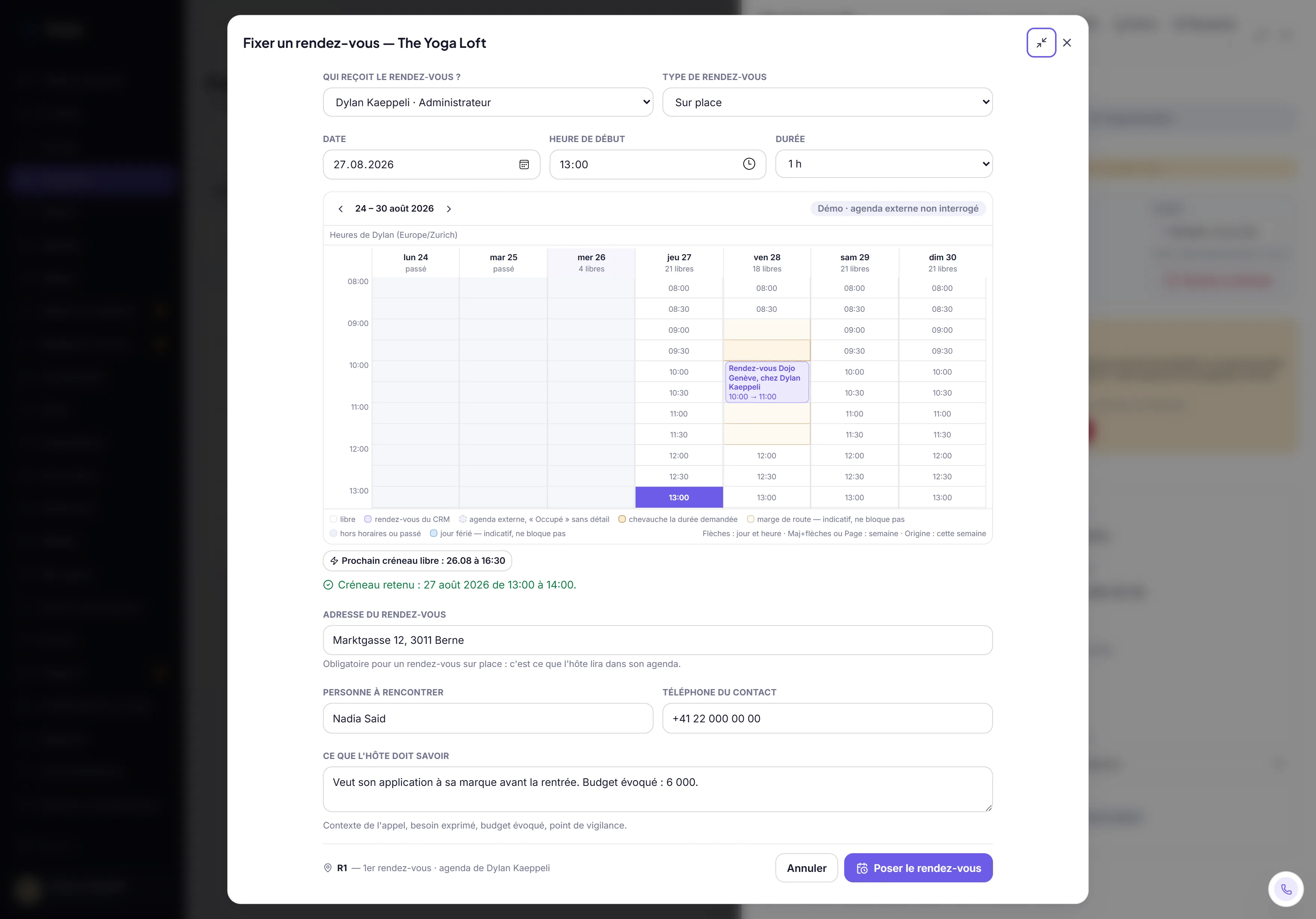
Screenshot of the Tekio CRM in demo mode, fictional data.
Who can see the address of an appointment?
Only the people allowed to see it. When you look at a colleague's calendar, their personal events are reduced to "Busy" on the server: the title, the description, the location and the attendees are stripped before they even reach your browser.
The calculation stays on the server
The server receives two addresses and returns nothing but a number of minutes. Nothing in the page, nothing in the network tab, contains the address of an appointment you are not allowed to see.
The cache stores no address
Results are kept as a fingerprint of the pair of addresses, never in clear text. Access to the database would make no address readable.
Sharing is given and taken back
A calendar is shared by name or by role, either as a plain read of availability or with the right to book. A share that is withdrawn is revoked and kept as a trace, it is not erased.
An outside calendar stays outside
The connection to a personal calendar goes through a private read-only address, stored on the server and never sent to the browser. What comes back is a busy block, without its content.
What happens when the appointment goes to someone else?
The CRM separates two roles that most tools confuse: the person who picked up and got the appointment, and the person who will attend it. The link is frozen in the database, which makes the commission impossible to dispute even months later.
The context travels with the appointment
What the host needs to know is a required field when you book with someone else: the need expressed, the budget mentioned, the point to watch. The appointment does not start from zero.
You declare what you do with the file
At the moment of booking, you have to choose: hand it over, or only show it. Until that is declared, the appointment does not go out. It avoids files that nobody knows who owns anymore.
The appointment is qualified afterward
Once it has happened, the host says what took place: closed and signed, to follow up, or no further action. As long as nothing is entered, the share of whoever brought it in stays pending.
The time shown is the host's
The grid always shows in the time zone of the person hosting the appointment, and that time zone is written on the screen. A team spread over several countries stops booking appointments at the wrong hour.
What does this feature not do?
Better said right away, because finding out after signing costs more: here are the four known limits of appointment booking, and why they are there.
Appointment booking does not suggest a replacement time slot
There is a button that jumps to the next free time slot in the week shown, and a grid where the bookable cells stand out at a glance. There is no engine that recomposes an optimal route.
The drive-time calculation does not include traffic
The duration is a stable trip time, not a traffic jam forecast. The fifteen-minute arrival buffer is there to absorb the ordinary, not a crash on the highway.
The buffers cannot be set by hand
Fifteen minutes to arrive and the rounding to the half hour are fixed in the product. If your business needs another rule, it is changed in the code of your instance, not in a settings screen.
Calendar connection goes through a private address
Today, an outside calendar is connected through its private calendar address, read only. One-click linking to a Google account is not in place.
How many appointments does your team cancel every month?
If the answer is "I don't know", that is already information. Thirty free minutes to look at how your appointments get booked today and where the drive is forgotten.